
Java Linked Lists Explained: A Clear Guide to Singly and Doubly Linked Lists
That structure is a linked list.
A linked list stores data in nodes. Each node knows where the next node is. Some lists also let each node know where the previous node is. That one idea creates a data structure that behaves very differently from an array.
Java gives you a built-in `LinkedList` class, but learning how linked lists work underneath makes the class easier to use well. It also helps with interviews, algorithm practice, and day-to-day decisions about which collection to pick.
This guide explains singly and doubly linked lists in Java, shows how their operations work, and compares them with Java’s built-in `LinkedList`.
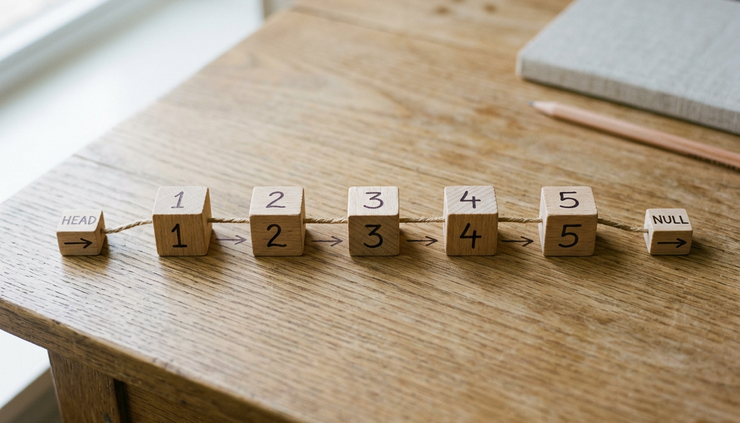
What a linked list is and why it exists
A linked list is a sequence of nodes. Each node contains two things:
A value
A reference to another node
In Java, the reference is usually a field that points to another object of the same node type.
A simple node might look like this:
```java
class Node {
int value;
Node next;
Node(int value) {
this.value = value;
}
}
```
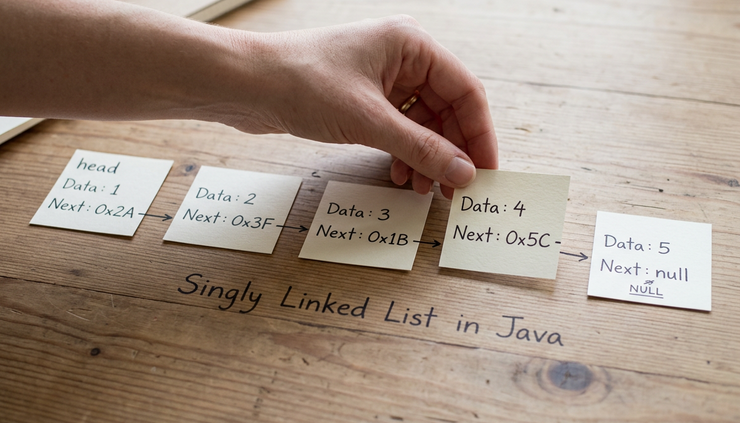
If one node has the value `10`, and its `next` field points to a node with the value `20`, those two nodes form part of a list.
```text
10 -> 20 -> 30 -> null
```
The final node points to `null`, which means the list has ended.
Linked lists do not store items side by side
An array stores elements in a continuous block of memory. If an array holds five integers, the values sit next to each other by index.
A linked list works differently. Its nodes can live in different places in memory. Each node carries the reference needed to reach the next one.
That difference changes the cost of common operations.
With an array, accessing index `100` is fast because Java can calculate where that value sits. With a linked list, Java must start at the head and follow references one by one until it reaches that position.
By contrast, inserting at the front of a linked list can be very fast. You create a new node and point it to the old head. No shifting is needed.
The head and tail of a list
Most linked lists keep track of at least the head.
The head is the first node in the list.
```text
head
|
v
10 -> 20 -> 30 -> null
```
Some lists also keep track of the tail.
The tail is the last node in the list.
```text
head tail
| |
v v
10 -> 20 -> 30 -> null
```
Keeping a tail reference makes adding to the end faster. Without it, the code must walk from the head to the last node every time.
Why linked lists still matter
In everyday Java code, `ArrayList` is often the better default collection. It is compact, fast for random access, and simple to use.
Linked lists still matter because they teach important ideas:
References between objects
Dynamic memory use
Traversal
Insert and delete operations
Queue and deque behavior
Pointer-style reasoning, even though Java uses references rather than raw pointers
They also appear in real systems as internal building blocks. Queues, adjacency lists, hash table buckets, undo chains, and task schedulers can all use linked structures.
How singly linked lists work in Java
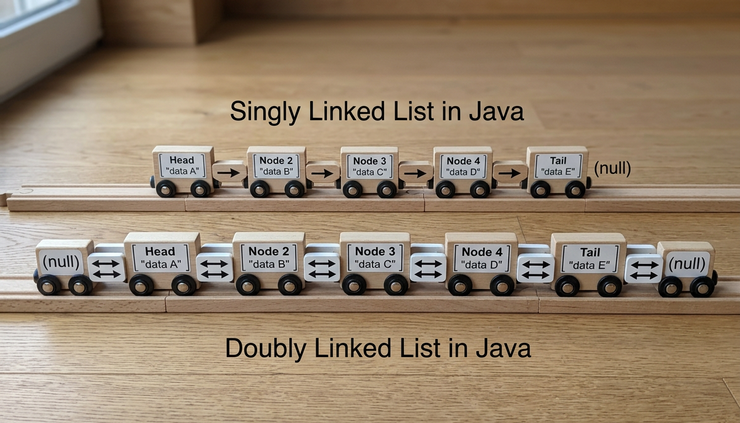
A singly linked list is the simplest linked list. Each node points in one direction, from the current node to the next node.
```text
A -> B -> C -> null
```
You can move forward through the list, but you cannot move backward unless you start over from the head.
Here is a small generic implementation:
```java
public class SinglyLinkedList<T> {
private Node<T> head;
private Node<T> tail;
private int size;
private static class Node<T> {
T value;
Node<T> next;
Node(T value) {
this.value = value;
}
}
public int size() {
return size;
}
public boolean isEmpty() {
return size == 0;
}
}
```
The list stores:
`head`, the first node
`tail`, the last node
`size`, the number of nodes
The nested `Node` class stores a value and a reference to the next node.
Adding to the front
Adding to the front is one of the cleanest linked list operations.
```java
public void addFirst(T value) {
Node<T> newNode = new Node<>(value);
if (isEmpty()) {
head = newNode;
tail = newNode;
} else {
newNode.next = head;
head = newNode;
}
size++;
}
```
If the list is empty, the new node becomes both the head and the tail.
If the list already has nodes, the new node points to the current head. Then the head reference moves to the new node.
Before:
```text
head
|
v
20 -> 30 -> null
```
After adding `10`:
```text
head
|
v
10 -> 20 -> 30 -> null
```
This operation takes constant time, written as `O(1)`, because it does not depend on the list length.
Adding to the end
If the list keeps a tail reference, adding to the end is also constant time.
```java
public void addLast(T value) {
Node<T> newNode = new Node<>(value);
if (isEmpty()) {
head = newNode;
tail = newNode;
} else {
tail.next = newNode;
tail = newNode;
}
size++;
}
```
Without a tail reference, `addLast` would need to start at the head and walk to the final node. That would take `O(n)` time.
The tail reference is a small field, but it saves a full traversal on every append.
Removing from the front
Removing the first item is also direct.
```java
public T removeFirst() {
if (isEmpty()) {
throw new IllegalStateException("List is empty");
}
T removedValue = head.value;
head = head.next;
size--;
if (isEmpty()) {
tail = null;
}
return removedValue;
}
```
The head moves to the second node. The old first node is no longer reachable from the list, so the garbage collector can reclaim it when appropriate.
Before:
```text
head
|
v
10 -> 20 -> 30 -> null
```
After removing first:
```text
head
|
v
20 -> 30 -> null
```
This is `O(1)`.
Searching a singly linked list
Search requires traversal.
```java
public boolean contains(T value) {
Node<T> current = head;
while (current != null) {
if (java.util.Objects.equals(current.value, value)) {
return true;
}
current = current.next;
}
return false;
}
```
The code starts at the head and checks each node. If it finds the value, it returns `true`. If it reaches `null`, the value is not in the list.
Search is `O(n)` because the value might be at the end, or it might not exist at all.
Removing by value
Removing a value from a singly linked list has one tricky part. To remove a node, the code must update the previous node’s `next` reference.
```java
public boolean remove(T value) {
if (isEmpty()) {
return false;
}
if (java.util.Objects.equals(head.value, value)) {
removeFirst();
return true;
}
Node<T> previous = head;
Node<T> current = head.next;
while (current != null) {
if (java.util.Objects.equals(current.value, value)) {
previous.next = current.next;
if (current == tail) {
tail = previous;
}
size--;
return true;
}
previous = current;
current = current.next;
}
return false;
}
```
The method tracks two references:
`current`, the node being inspected
`previous`, the node right before it
When the value is found, `previous.next` skips over `current`.
Before removing `20`:
```text
10 -> 20 -> 30 -> null
```
After:
```text
10 -> 30 -> null
```
The operation is still `O(n)` because the list might need to scan many nodes before finding the value.
How doubly linked lists work in Java
A doubly linked list stores two references in each node:
`next`, pointing forward
`previous`, pointing backward
```text
null <- A <-> B <-> C -> null
```
This extra reference gives the list more flexibility. You can move forward and backward. You can also remove a known node without searching for the previous node first.
Here is a basic node structure:
```java
private static class Node<T> {
T value;
Node<T> next;
Node<T> previous;
Node(T value) {
this.value = value;
}
}
```
A doubly linked list usually tracks both `head` and `tail`.
```java
public class DoublyLinkedList<T> {
private Node<T> head;
private Node<T> tail;
private int size;
private static class Node<T> {
T value;
Node<T> next;
Node<T> previous;
Node(T value) {
this.value = value;
}
}
}
```
Adding to the front
Adding to the front requires updating two links.
```java
public void addFirst(T value) {
Node<T> newNode = new Node<>(value);
if (size == 0) {
head = newNode;
tail = newNode;
} else {
newNode.next = head;
head.previous = newNode;
head = newNode;
}
size++;
}
```
The new node points forward to the old head. The old head points backward to the new node. Then the list updates `head`.
Adding to the end
Adding to the end is similar.
```java
public void addLast(T value) {
Node<T> newNode = new Node<>(value);
if (size == 0) {
head = newNode;
tail = newNode;
} else {
tail.next = newNode;
newNode.previous = tail;
tail = newNode;
}
size++;
}
```
The old tail points forward to the new node. The new node points backward to the old tail. Then the list updates `tail`.
Removing from the end
A doubly linked list makes `removeLast` efficient.
```java
public T removeLast() {
if (size == 0) {
throw new IllegalStateException("List is empty");
}
T removedValue = tail.value;
tail = tail.previous;
size--;
if (size == 0) {
head = null;
} else {
tail.next = null;
}
return removedValue;
}
```
In a singly linked list, removing the last node is harder. You must find the node before the tail, which takes a traversal.
In a doubly linked list, the tail already knows its previous node. That makes removing the last item `O(1)`.
Removing a known node
If you already have a reference to a node, a doubly linked list can remove it without searching from the head.
```java
private void removeNode(Node<T> node) {
Node<T> before = node.previous;
Node<T> after = node.next;
if (before == null) {
head = after;
} else {
before.next = after;
}
if (after == null) {
tail = before;
} else {
after.previous = before;
}
size--;
}
```
This is one reason doubly linked lists are useful in caches and deques. They can move nodes around quickly when another structure already holds references to those nodes.
The tradeoff of doubly linked lists
A doubly linked list is more flexible than a singly linked list, but it uses more memory per node.
Each node stores:
The value
A reference to the next node
A reference to the previous node
That extra previous reference is not free. It also gives your code another link to maintain. If you update one side but forget the other, the list can become inconsistent.
A doubly linked list is a good fit when you need frequent operations at both ends or need to move backward through the list.
Singly and doubly linked lists compared
Singly and doubly linked lists solve similar problems, but their strengths differ.
Operation | Singly linked list | Doubly linked list |
Add to front | `O(1)` | `O(1)` |
Add to end with tail | `O(1)` | `O(1)` |
Remove from front | `O(1)` | `O(1)` |
Remove from end | `O(n)` | `O(1)` |
Search by value | `O(n)` | `O(n)` |
Move backward | Not supported | Supported |
Extra memory per node | Lower | Higher |
The main difference is direction.
A singly linked list is like a one-way path. You can move forward, node by node.
A doubly linked list is like a two-way path. You can move forward or backward, but every node carries an extra reference.
When a singly linked list makes sense
Use a singly linked list when the code mostly works from the front or walks forward.
Good fits include:
A simple stack
A forward-only queue with both head and tail
A chain of tasks processed in order
A learning implementation for references and traversal
A singly linked list keeps the node structure small. It also has fewer links to update, which can make it easier to reason about.
When a doubly linked list makes sense
Use a doubly linked list when the code needs efficient operations at both ends or needs backward movement.
Good fits include:
A deque
Undo and redo navigation
Browser-style history
LRU cache internals
Music playlist navigation
Doubly linked lists are also useful when removing a node by reference is common. If another data structure can find the node, the list can unlink it quickly.
When neither is the best choice
A linked list is not always the right answer.
If the code frequently reads by index, an array-backed structure is usually better. In Java, that often means `ArrayList`.
This is fast:
```java
arrayList.get(5000);
```
This can be slow on a linked list:
```java
linkedList.get(5000);
```
The linked list must walk through nodes to reach index `5000`. That takes time proportional to the distance it travels.
Linked lists also have overhead. Each node is a separate object with references. That can create more work for memory management and may be less cache-friendly than an array.
Java’s built-in LinkedList class
Java includes `java.util.LinkedList`, a general-purpose doubly linked list implementation.
```java
import java.util.LinkedList;
public class Example {
public static void main(String[] args) {
LinkedList<String> names = new LinkedList<>();
names.add("Ada");
names.add("Grace");
names.addFirst("Edsger");
names.addLast("Barbara");
System.out.println(names);
}
}
```
`LinkedList` implements both `List` and `Deque`.
That means it can act like a list:
```java
names.add("Linus");
String first = names.get(0);
```
It can also act like a queue or deque:
```java
LinkedList<String> queue = new LinkedList<>();
queue.addLast("task-1");
queue.addLast("task-2");
String nextTask = queue.removeFirst();
```
The `Deque` side is often where `LinkedList` feels most natural.
Useful LinkedList methods
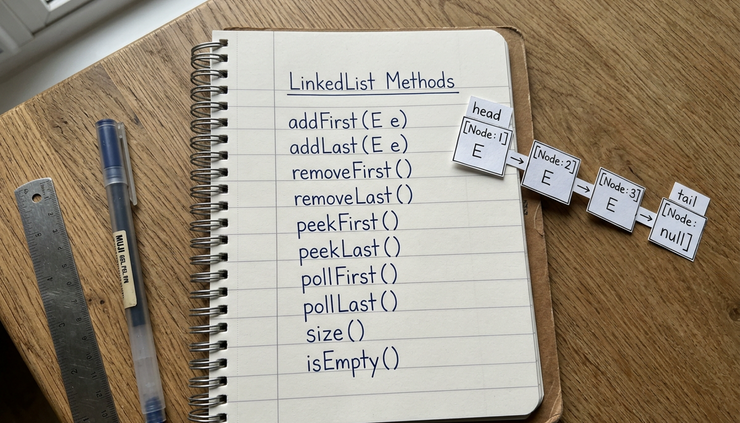
Here are common methods from Java’s `LinkedList` class.
Method | What it does |
`addFirst(value)` | Inserts at the front |
`addLast(value)` | Inserts at the end |
`removeFirst()` | Removes and returns the first item |
`removeLast()` | Removes and returns the last item |
`peekFirst()` | Reads the first item without removing it |
`peekLast()` | Reads the last item without removing it |
`get(index)` | Reads by position, with traversal |
`contains(value)` | Searches for a value |
`size()` | Returns the number of elements |
Some methods throw an exception when the list is empty. Others return `null`.
For example:
```java
LinkedList<Integer> numbers = new LinkedList<>();
// Throws NoSuchElementException if empty
// numbers.removeFirst();
// Returns null if empty
Integer value = numbers.pollFirst();
```
This distinction matters when empty lists are normal in your program.
LinkedList as a stack
A stack uses last-in, first-out behavior. The last item added is the first item removed.
```java
LinkedList<String> stack = new LinkedList<>();
stack.push("A");
stack.push("B");
stack.push("C");
System.out.println(stack.pop()); // C
System.out.println(stack.pop()); // B
```
Java also has `ArrayDeque`, which is often preferred for stack behavior. Still, `LinkedList` can do the job because it implements `Deque`.
LinkedList as a queue
A queue uses first-in, first-out behavior. The first item added is the first item removed.
```java
LinkedList<String> queue = new LinkedList<>();
queue.offer("A");
queue.offer("B");
queue.offer("C");
System.out.println(queue.poll()); // A
System.out.println(queue.poll()); // B
```
For queue behavior, `LinkedList` is clear and readable. `ArrayDeque` is also a strong choice and often performs well.
LinkedList as a list
Because `LinkedList` implements `List`, it supports index-based methods.
```java
LinkedList<String> letters = new LinkedList<>();
letters.add("A");
letters.add("B");
letters.add("C");
System.out.println(letters.get(1)); // B
```
This works, but it does not mean it is the best use of the class.
`get(1)` is fine. `get(100000)` can be costly. The list has to traverse nodes to find the requested index.
If you need lots of indexed reads, `ArrayList` is usually a better fit.
How to choose the right list in Java
Choosing a data structure is mostly about access patterns.
Ask what the code does most often.
If it reads by index, use `ArrayList`.
If it adds and removes at both ends, consider `ArrayDeque` or `LinkedList`.
If it needs to remove known nodes from the middle and already has references to them, a custom doubly linked list may make sense.
If it only needs simple forward traversal and frequent front insertion, a singly linked list can be enough.
ArrayList and LinkedList have different strengths
`ArrayList` stores elements in an internal array. It is fast for indexed access and iteration. Adding to the end is usually fast, though the internal array sometimes needs to grow.
`LinkedList` stores elements in nodes. It is good at adding and removing from the ends. It is not good at random indexed access.
Need | Better choice |
Fast `get(index)` | `ArrayList` |
Frequent add at end | Usually `ArrayList` |
Frequent add or remove at front | `LinkedList` or `ArrayDeque` |
Queue behavior | `ArrayDeque` or `LinkedList` |
Stack behavior | `ArrayDeque` |
Frequent search by value | Neither is ideal without another structure |
Memory efficiency for many elements | Usually `ArrayList` |
The important point is simple: a linked list is not a faster array. It is a different structure with different tradeoffs.
Common mistakes with linked lists
Linked list code is full of small edge cases. Most bugs come from forgetting one of them.
Watch for these cases:
Empty list
List with one node
Removing the head
Removing the tail
Updating `size`
Updating both `next` and `previous` in a doubly linked list
Returning the right value after removal
Stopping traversal at `null`
A good habit is to draw the nodes before writing the code. Then update one reference at a time.
For example, to insert between two nodes in a doubly linked list:
```text
A <-> C
```
Insert `B`:
```text
A <-> B <-> C
```
The code needs four link updates:
```java
b.previous = a;
b.next = c;
a.next = b;
c.previous = b;
```
If any of those links are missing, traversal may break in one direction.
A practical rule for learning
When learning linked lists, write your own small implementation. Keep it simple.
Start with these methods:
```java
addFirst(value)
addLast(value)
removeFirst()
contains(value)
size()
```
Then add:
```java
removeLast()
remove(value)
get(index)
```
Finally, build a doubly linked list and compare the code.
This exercise teaches more than memorizing complexity charts. It shows how references change, why null checks matter, and why the head and tail are special.
A practical rule for real Java code
When writing production Java, prefer the standard collections unless there is a clear reason not to.
Use `ArrayList`, `ArrayDeque`, `HashMap`, `HashSet`, and `LinkedList` when they fit. They are tested, familiar, and readable.
Write a custom linked list when:
You are learning
You are solving an algorithm problem
You need behavior the standard classes do not provide
You need node-level control for a specific data structure
For most application code, the best collection is the one that makes the program clear and efficient enough without extra complexity.
The key takeaway
Java linked lists are built from nodes and references. A singly linked list points forward. A doubly linked list points forward and backward. That small design difference affects how each structure handles insertion, removal, traversal, and memory.
Use a singly linked list when forward-only movement is enough. Use a doubly linked list when both ends matter or backward movement helps. Use Java’s built-in `LinkedList` when you want a ready-made doubly linked list, especially for deque-style operations.
For indexed access, reach for `ArrayList`. For stack or queue behavior, compare `ArrayDeque` and `LinkedList`. For learning, build a small linked list yourself and trace every reference by hand.
That is the clearest way to make linked lists feel less abstract: one node, one reference, and one operation at a time.


Comments