
How to Convert Recursive Methods to Iterative Loops for Better Performance and Less Memory
Recursive code can feel elegant, until it crashes with a stack overflow or slows down under real input. A method that works perfectly for 10 items may fail at 100,000 because every recursive call adds another frame to the call stack.
That does not mean recursion is bad. Recursion is often the clearest way to describe problems like tree traversal, pathfinding, parsing, and divide-and-conquer algorithms. But in production code, clarity has to share the stage with speed, memory use, and reliability.
The good news is that most recursive methods can be converted to iterative loops. Once you understand what the call stack is doing for you, you can replace it with a `for` loop, a `while` loop, or your own stack or queue.
This guide walks through the process step by step, with clear examples in Java. The same ideas apply in C#, JavaScript, Python, Go, and many other languages.
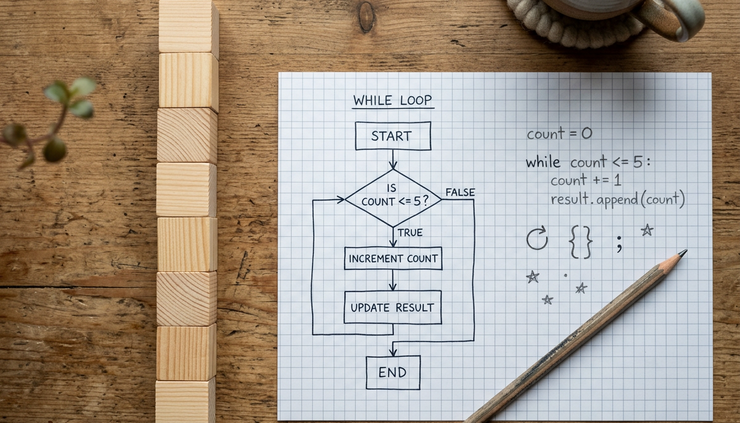
Why convert recursion to iteration?
Recursion works by having a method call itself. Each call gets its own local variables, parameters, and return location. The runtime stores that information on the call stack.
That call stack is useful, but it is not free.
When input grows large, recursive methods can run into several issues:
More memory use
Each recursive call adds a new stack frame. A method with 100,000 recursive calls may need 100,000 stack frames.
Stack overflow risk
If the recursion goes too deep, the program can crash even if the algorithm itself is logically correct.
Extra call overhead
Calling a method repeatedly costs more than updating a variable inside a loop.
Less control over execution
With loops, it is often easier to pause, resume, log progress, or exit early.
Iteration uses loops instead of repeated method calls. In many cases, an iterative version uses only a few variables, so memory stays nearly constant as input grows.
Take factorial as a simple example. The factorial of `5` is:
```text
5 4 3 2 1 = 120
```
A recursive version mirrors the math nicely:
```java
public static int factorialRecursive(int n) {
if (n <= 1) {
return 1;
}
return n * factorialRecursive(n - 1);
}
```
This version is easy to read. The base case is `n <= 1`, and each call makes the problem smaller.
An iterative version does the same work with a loop:
```java
public static int factorialIterative(int n) {
int result = 1;
for (int i = 2; i <= n; i++) {
result *= i;
}
return result;
}
```
Both methods return the same result for normal inputs. The difference is how they get there.
The recursive method waits for each deeper call to finish before it can multiply and return. The iterative method keeps the running answer in `result` and updates it each time through the loop.
For small inputs, the practical difference may be tiny. For large inputs, the iterative version avoids stacking up call frames.
A recursive method often hides a loop inside the call stack. Converting it to iteration means making that hidden loop explicit.
How recursion maps to loops
Before rewriting code, it helps to see what recursion is really doing.
Most recursive methods have three parts:
A base case
This stops the recursion.
A recursive case
This calls the same method with a smaller or simpler input.
Some state
This includes parameters, local variables, and any work waiting to happen after the recursive call returns.
When you convert recursion to iteration, you replace those pieces with loop equivalents.
Recursive concept | Iterative equivalent |
Base case | Loop condition or early return |
Recursive call | Update variables and continue the loop |
Parameters | Loop variables |
Return value | Accumulator or result variable |
Call stack | Explicit stack, queue, or simple loop state |
Some conversions are direct. Factorial, counting, summing, and searching through a linked list often turn into simple `while` or `for` loops.
Other conversions need an explicit data structure. Tree traversal is a classic example. A recursive tree method uses the call stack to remember which nodes still need work. An iterative tree method often uses a `Stack<Node>` to store that same information.
Here is the key question:
Does the recursive method need to remember unfinished work?
If the answer is no, a simple loop may be enough.
If the answer is yes, you probably need a stack or queue.
Example with a simple countdown
Start with a tiny recursive method:
```java
public static void printDownRecursive(int n) {
if (n <= 0) {
return;
}
System.out.println(n);
printDownRecursive(n - 1);
}
```
This prints:
```text
5
4
3
2
1
```
The recursive call is the last thing the method does. There is no pending work after the call returns. That makes it easy to convert:
```java
public static void printDownIterative(int n) {
while (n > 0) {
System.out.println(n);
n--;
}
}
```
The loop condition replaces the base case. The `n--` replaces the recursive call with `n - 1`.
This kind of recursion is often called tail recursion, because the recursive call appears at the tail end of the method. Some languages can turn certain tail-recursive methods into loops behind the scenes, but many common runtimes do not guarantee it. Writing the loop yourself makes the behavior clear.

A step-by-step guide to converting recursive methods
Converting recursion is easier when you do it methodically. Do not start by rewriting everything at once. Treat the recursive version as a map.
Step 1. Identify the base case
The base case tells you when the method stops.
In factorial, the base case is:
```java
if (n <= 1) {
return 1;
}
```
In a loop, this usually becomes one of these:
```java
while (n > 1) {
// Keep working
}
```
or:
```java
if (n <= 1) {
return 1;
}
```
The second option is useful when you want to handle small inputs before entering the loop.
Step 2. Find what changes in each recursive call
Look at the arguments passed to the next call.
```java
return n * factorialRecursive(n - 1);
```
The method calls itself with `n - 1`. That means each loop pass should reduce `n`, or use another variable that moves from `n` toward the base case.
For example:
```java
while (n > 1) {
n--;
}
```
The exact update depends on the method. You might increment an index, move to the next node, shrink a range, or remove an item from a stack.
Step 3. Create variables for carried state
Recursive code stores state in parameters and local variables. Iterative code needs variables that live across loop passes.
In factorial, the recursive version stores pending multiplication in the call stack:
```java
return n * factorialRecursive(n - 1);
```
The iterative version needs an accumulator:
```java
int result = 1;
```
Then the loop updates it:
```java
result *= n;
```
Here is one valid iterative factorial using `while`:
```java
public static int factorialIterative(int n) {
int result = 1;
while (n > 1) {
result *= n;
n--;
}
return result;
}
```
This method carries two pieces of state:
`result`
The answer built so far
`n`
The current number still being processed
Step 4. Preserve the order of work
Some recursive methods do work before the recursive call. Some do work after. Some do both.
That order matters.
Look at this method:
```java
public static void printUpRecursive(int n) {
if (n <= 0) {
return;
}
printUpRecursive(n - 1);
System.out.println(n);
}
```
If you call `printUpRecursive(5)`, it prints:
```text
1
2
3
4
5
```
The print happens after the recursive call, so the deepest call prints first.
A quick loop that prints before decrementing would get the order wrong. Since this method only counts upward from `1` to `n`, the iterative code can use a simple `for` loop:
```java
public static void printUpIterative(int n) {
for (int i = 1; i <= n; i++) {
System.out.println(i);
}
}
```
For more complex methods, especially tree methods, preserving order may require a stack.
Step 5. Test the iterative version against the recursive version
Keep the recursive method around while you write the iterative one. Use it as a reference.
Test with:
The smallest valid input
A typical input
A larger input
An edge case, such as `0`, an empty list, or `null`
Inputs where order matters
For factorial, you might compare:
```java
System.out.println(factorialRecursive(0)); // 1
System.out.println(factorialIterative(0)); // 1
System.out.println(factorialRecursive(5)); // 120
System.out.println(factorialIterative(5)); // 120
```
If both versions match across your test cases, you can then decide whether to remove the recursive method.
Comparing recursive and iterative approaches with real examples
Simple examples help, but the real value comes from recognizing patterns. Let’s compare three common cases: factorial, Fibonacci, and tree traversal.
Example 1. Factorial with an accumulator
The recursive factorial method is short:
```java
public static long factorialRecursive(int n) {
if (n <= 1) {
return 1;
}
return n * factorialRecursive(n - 1);
}
```
The iterative version is also short:
```java
public static long factorialIterative(int n) {
long result = 1;
for (int i = 2; i <= n; i++) {
result *= i;
}
return result;
}
```
The two versions are close in readability. The iterative version has a clear memory advantage because it does not add a stack frame for each number.
Version | Time use | Extra memory use | Main risk |
Recursive factorial | Linear | Linear stack growth | Stack overflow for deep calls |
Iterative factorial | Linear | Constant | Integer overflow if the result gets too large |
Both versions still have to multiply numbers. Iteration does not change the mathematical size of the result. It changes how much extra memory the method uses while computing it.
Example 2. Fibonacci without repeated work
Fibonacci is a classic recursion example, but the naive recursive version is inefficient because it repeats the same calculations many times.
```java
public static long fibonacciRecursive(int n) {
if (n <= 1) {
return n;
}
return fibonacciRecursive(n - 1) + fibonacciRecursive(n - 2);
}
```
This is elegant, but it branches into two calls at almost every level. The same values get recalculated over and over.
An iterative version keeps only the last two values:
```java
public static long fibonacciIterative(int n) {
if (n <= 1) {
return n;
}
long previous = 0;
long current = 1;
for (int i = 2; i <= n; i++) {
long next = previous + current;
previous = current;
current = next;
}
return current;
}
```
For example, to find `fibonacciIterative(6)`:
```text
0, 1, 1, 2, 3, 5, 8
```
The loop builds the sequence once. It does not recompute earlier values.
This is one place where iteration can improve both performance and memory use in a big way. The recursive version has repeated calls. The iterative version walks forward one step at a time.
Example 3. Tree traversal with an explicit stack
Some recursive methods cannot be replaced by a few variables because they branch. Tree traversal is a good example.
Suppose you have a simple binary tree node:
```java
class Node {
int value;
Node left;
Node right;
Node(int value) {
this.value = value;
}
}
```
A recursive preorder traversal visits the current node, then the left subtree, then the right subtree:
```java
public static void preorderRecursive(Node node) {
if (node == null) {
return;
}
System.out.println(node.value);
preorderRecursive(node.left);
preorderRecursive(node.right);
}
```
This code is clean because the call stack remembers where to return after finishing each subtree.
To convert it, you provide your own stack:
```java
import java.util.Stack;
public static void preorderIterative(Node root) {
if (root == null) {
return;
}
Stack<Node> stack = new Stack<>();
stack.push(root);
while (!stack.isEmpty()) {
Node current = stack.pop();
System.out.println(current.value);
if (current.right != null) {
stack.push(current.right);
}
if (current.left != null) {
stack.push(current.left);
}
}
}
```
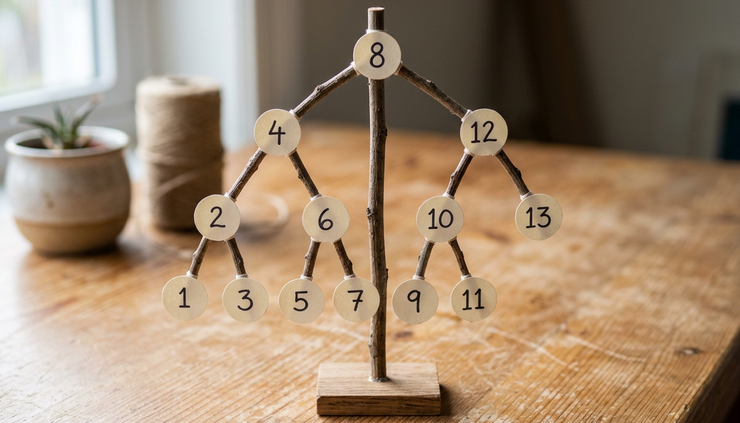
Notice the order of the pushes. The stack is last in, first out. To visit the left child before the right child, the method pushes the right child first, then the left child.
That small detail preserves the same order as the recursive version.
What the comparison shows
Recursive and iterative code can describe the same algorithm, but they make different trade-offs.
Situation | Recursion often feels better when | Iteration often works better when |
Linear counting | The method is tiny and depth is limited | Input can be very large |
Accumulating a result | The recursive definition is clearer | A loop can carry the result directly |
Tree or graph traversal | The structure is naturally recursive | You need control over memory and traversal order |
Repeated subproblems | The formula is easy to write | Repeated calls would waste time |
Production reliability | Input size is controlled | Input depth is unknown or user-driven |
A good rule of thumb is this:
Use recursion when it makes the code easier to understand and the depth is safely limited. Use iteration when input may grow deep, memory matters, or repeated method calls add avoidable cost.
Common mistakes when rewriting recursive code
Converting recursion to loops is not hard once the pattern clicks, but a few mistakes are common.
Forgetting the base case
Every recursive method has a stop condition. Every loop needs one too.
This recursive method stops when `n <= 0`:
```java
public static int sumRecursive(int n) {
if (n <= 0) {
return 0;
}
return n + sumRecursive(n - 1);
}
```
A loop must also stop:
```java
public static int sumIterative(int n) {
int sum = 0;
while (n > 0) {
sum += n;
n--;
}
return sum;
}
```
If you forget `n--`, the loop never reaches the stopping condition.
Losing work that happened after the recursive call
This is one of the trickiest parts.
In this method, the print happens after the call:
```java
public static void printAfterRecursive(int n) {
if (n == 0) {
return;
}
printAfterRecursive(n - 1);
System.out.println(n);
}
```
The iterative version must match that order. For this simple case, counting upward works:
```java
public static void printAfterIterative(int n) {
for (int i = 1; i <= n; i++) {
System.out.println(i);
}
}
```
For a branching problem, you may need a stack that stores not only the node, but also whether that node has already been visited.
Using a queue when you need a stack
A recursive call stack behaves like a stack. The most recent call finishes first.
If you replace it with a queue, the traversal order changes. That can be fine if you want breadth-first behavior, but it will not match depth-first recursion.
Use a stack when you want to mimic recursive depth-first behavior.
Use a queue when you intentionally want level-by-level behavior, such as breadth-first search.
Making the loop harder to read than the recursion
Performance matters, but readability still matters. If the iterative version turns into a confusing knot of flags, indexes, and special cases, pause and rethink the design.
Sometimes the best answer is not “convert everything.” The best answer is to convert the recursive methods that actually need it.
Good candidates include methods that:
Can receive large or unknown input sizes
Run in performance-sensitive paths
Have caused stack overflow errors
Repeat the same work many times
Are simple enough to express clearly with a loop
Poor candidates include tiny recursive helpers with safe depth and much clearer recursive structure.

A handy checklist for your next conversion
When you sit down to convert a recursive method, work through this checklist.
Write down the base case
What input makes the method stop?
Find the changing input
Which parameter moves toward the base case?
List the state
Which values must survive from one step to the next?
Decide whether you need a data structure
Use a simple loop for linear recursion. Use a stack or queue for branching recursion.
Preserve the order of work
Check whether the recursive method does work before the call, after the call, or both.
Test both versions
Compare outputs before deleting the recursive method.
Try a large input
This is where the iterative version should show its value.
Here is a compact example using the checklist with a linked list.
Assume this simple node type:
```java
class ListNode {
int value;
ListNode next;
ListNode(int value) {
this.value = value;
}
}
```
A recursive method to count nodes might look like this:
```java
public static int countRecursive(ListNode node) {
if (node == null) {
return 0;
}
return 1 + countRecursive(node.next);
}
```
Now apply the checklist.
The base case is `node == null`.
The changing input is `node.next`.
The state is the running count.
No stack is needed because this is a straight line, not a branch.
The iterative version becomes:
```java
public static int countIterative(ListNode node) {
int count = 0;
while (node != null) {
count++;
node = node.next;
}
return count;
}
```
This version is short, clear, and safe for much longer lists because it does not create one stack frame per node.
That is the ideal result of a conversion: same behavior, clearer memory use, and no unnecessary call stack growth.
Practice turns the pattern into a habit
The best way to get comfortable is to practice on small methods first. Start with methods that count, sum, search, or walk through a list. Then move on to trees and graphs, where you will practice using your own stack or queue.
Here are a few exercises to try:
Convert a recursive method that sums numbers from `1` to `n`.
Convert a recursive linked list search into a `while` loop.
Convert recursive tree preorder traversal using a stack.
Convert recursive tree breadth-style logic using a queue.
Rewrite a naive recursive Fibonacci method with a loop.
As you practice, pay attention to the same three questions every time:
When does the method stop?
What state needs to carry forward?
What work is waiting to happen later?
Once those answers are clear, the loop usually becomes clear too.
Recursive solutions are often beautiful because they match the shape of the problem. Iterative solutions are often practical because they reduce stack use, avoid deep call chains, and give you more control over execution.
You do not need to stop using recursion. Just learn to recognize when a loop is the better tool. Pick one recursive method in your own code today, trace what the call stack is doing, and rewrite it as a loop. The more you practice, the faster you will see the pattern.


Comments